| SDK 版本 | 修改内容 | 修改时间 |
|---|---|---|
| v1.0.0 | - | |
| v1.0.1 | 新增game-vivo-config.js配置项 新增adsense脚本加载完成事件 |
- |
| v1.0.2 | adsense脚本加载完成返回值修改 新增adsense脚本加载时长埋点上报 |
2026-06-23 |
- 若游戏页使用iframe在详情页内嵌打开,查看目录二、目录三
- 若游戏页使用一个新的webview打开,查看目录二、目录四

├── index.html     # 游戏详情页
├── detal/         # 游戏详情页静态资源
│   ├── xxx.js
│   └── xxxx.css
├── manifest.json  # 配置项(配置说明见2.3)
├── game-vivo-config.js  # 同manifest.json(若同manifest与本身项目配置冲突,可以改用这个)
├── icon.png       # 游戏icon(需要替换)
├── sdkAds.js      # 广告通信和API初始化(需自行实现广告逻辑)
├── game.html      # 游戏页面(需要替换)
└── game.js        # 游戏静态资源(游戏页面相关静态资源可在根目录创建game文件进行管理)
// mainifest.json
{
  "iframeOpen": true, // 游戏页使用iframe内嵌,更多查看目录三
  "gameInfo": {
    "gameLink": "game.html?a=xxxx", // 根目录的game.html,后面可根据需要拼接参数
    "gameName": "游戏名称",
    "icon": "icon.png", // 请替换根目录下的icon
    "adsenseAccountId": "ca-pub-xxxxxxxxxxx",
    "gameDesc": "游戏介绍",
    "score": 4.3,
    "adList": ["广告1号位", "广告2号位"],
    "recommendList": [
      // 8个游戏推荐
      {
        "gameLink": "https://xxxxxx", // 游戏完整链接
        "gameName": "游戏名称",
        "icon": "游戏icon链接"
      }
    ]
  }
}
SDK 与详情页代码包分别管理版本。更新 JS SDK 时,请根据下表同步选择适配的详情页代码包。
| 详情页代码包版本 | 适配 SDK 版本 | 代码包 | 修改内容 | 修改时间 |
|---|---|---|---|---|
| v1.0.0 | v1.0.0 | - | - | - |
| v1.0.1 | v1.0.1 | 下载 | 1. 添加深色适配 2.优化广告banner尺寸 |
- |
| v1.0.2 | v1.0.2 | 下载 | 1. play按钮曝光埋点新时长参数 2.根据Adsense加载完成返回修改监听方法 3.修复iframe方式下详情页停留时长上报丢失 4. play按钮在广告banner显示后延迟1s 或者 adsense加载完成延迟5s显示 5. loading页保留banner广告显示 |
2026-09-07 |
manifest.json配置"iframeOpen": true
function postMessageToParent(params) {
  window.parent.postMessage(
    JSON.stringify(params),
    "https://xxxxxxx", // 父window的域名
  );
}
window.addEventListener("message", (e) => {
  // 根据消息是否来自父window的域名,判断是否过滤
  if (e.origin !== "https://xxxxxxx") {
    console.warn("其他消息(来自:" + e.origin + ")");
    return;
  }
  console.log(e, "从父window发过来的消息");
  try {
    const paramsFromParent = JSON.parse(e.data);

    // 根据methon类型,执行不同逻辑
  } catch (error) {
    console.log(error);
  }
});
为了便于平台分析游戏页面加载性能并进行优化,请在游戏首屏加载完成(例如:首个可交互画面展示)调用getPerformanceTrack() 方法,并将性能数据通过postMessage上报给父页面。
由于父窗口无法准确获取 iframe 内页面的性能指标,因此需要在 游戏页面内部执行该方法 并主动上报
async function reportGameLoading() {
  const performanceData = await getPerformanceTrack();

  postMessageToParent({
    method: "gameLoadingCompleted",
    data: performanceData,
  });
}
getPerformanceTrack方法添加到你的项目中:function getPerformanceTrack() {
return new Promise((resolve) => {
let count = 0;
function check() {
if (window.performance && window.performance.timing) {
const timing = window.performance.timing;
// 等待 loadEventEnd 产生
if (timing.loadEventEnd === 0) {
if (count++ > 100) {
resolve({});
return;
}
setTimeout(check, 100);
return;
}
const paints = performance.getEntriesByType("paint");
const fcp = paints?.find(
(paint) => paint.name === "first-contentful-paint",
);
const fp = paints?.find((paint) => paint.name === "first-paint");
const calc = (end, start) => {
return end > 0 && start > 0 && end >= start ? end - start : 0;
};
const {
navigationStart,
responseStart,
domContentLoadedEventEnd,
loadEventEnd,
domainLookupEnd,
domainLookupStart,
connectEnd,
connectStart,
secureConnectionStart,
domComplete,
domLoading,
domInteractive,
} = timing;
const effectiveLoadEventEnd =
loadEventEnd > 0
? loadEventEnd
: domComplete > 0
? domComplete
: Date.now();
resolve({
ttfb: calc(responseStart, navigationStart),
wst: calc(responseStart, navigationStart),
tti: calc(domInteractive, navigationStart),
ready: calc(domContentLoadedEventEnd, navigationStart),
load: calc(effectiveLoadEventEnd, navigationStart),
dns: calc(domainLookupEnd, domainLookupStart),
tcp: calc(connectEnd, connectStart),
ssl:
secureConnectionStart > 0
? calc(connectEnd, secureConnectionStart)
: 0,
dom: calc(domComplete, domLoading),
fpt: fp ? Math.max(0, parseInt(fp.startTime.toFixed())) : 0,
fcp: fcp ? Math.max(0, parseInt(fcp.startTime.toFixed())) : 0,
});
} else {
resolve(null);
}
}
check();
});
}
自行在sdkAds.js中实现广告通信以及Ad Placement API初始化
广告详细参数介绍请参考谷歌参数用法:https://developers.google.com/ad-placement/apis/adbreak?hl=zh-cn
<script :src="`https://sdk.vivofungame.com/${version}/index.min.js`"></script>
按照“一、SDK 版本记录”中的版本号修改 version,目前最新版本是 v1.0.2
在
标签中配置<script>
window.vivoSDKConfig = {
adConfig: {
adTest: true, // 启用Adsense测试模式,若想启用正式模式请删掉该字段
adFrequencyHint: '', // 广告展示频次,默认120s
adClient: "ca-pub-xxxxx"
},
adsComplete: function (state) {
if (state.done && state.success) {
console.log("AdSense 已加载完成");
}
if (state.done && !state.success) {
console.log("AdSense 加载结束,但加载失败");
}
},
}
</script>
adsComplete 会返回一个 state 对象:
| 字段 | 类型 | 含义 |
|---|---|---|
done |
boolean |
本次 AdSense 加载流程是否已经结束。true 代表流程已收口,不会一直等待 |
success |
boolean |
本次 AdSense 是否加载成功 |
常见状态可以这样理解:
state.done |
state.success |
含义 |
|---|---|---|
true |
true |
AdSense 已加载完成,脚本可正常使用 |
true |
false |
AdSense 加载流程已结束,但加载失败,常见于超时、网络异常、域名被拦截等场景 |
如未传 adsComplete,或者业务存在晚于 SDK 完成时机才开始监听的情况,建议使用以下方式:
window.vivoSDK.onAdsComplete(function (state) {
  if (state.done && state.success) {
    console.log("AdSense 已加载完成");
  }

  if (state.done && !state.success) {
    console.log("AdSense 加载结束,但加载失败");
  }
});

window.addEventListener("vivoSDK:adsComplete", function (event) {
  if (event.detail && event.detail.done && event.detail.success) {
    console.log("AdSense 已加载完成");
  }

  if (event.detail && event.detail.done && !event.detail.success) {
    console.log("AdSense 加载结束,但加载失败");
  }
});

var adState =
  window.vivoSDK && window.vivoSDK.getAdSenseState
    ? window.vivoSDK.getAdSenseState()
    : { done: false, success: false };

if (adState.done && adState.success) {
  console.log("AdSense 已加载完成");
}

if (adState.done && !adState.success) {
  console.log("AdSense 加载结束,但加载失败");
}
请务必把这个方法加到游戏首屏加载完成的时候,上报游戏页面的加载时长数据,便于后续的分析优化
window.vivoSDK.gameLoadingCompleted("game", options);
自行实现Ad Placement API广告相关逻辑
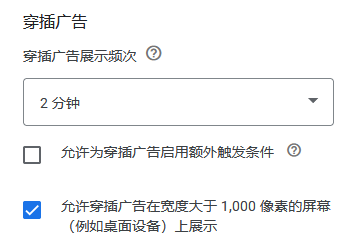
设置路径:Google AdSense—广告—编辑管理自动广告—重叠式广告格式—高级设置
(1)不勾选:允许使用动态锚定广告
(2)选择锚定广告位置:顶部或底部
参考如下图1:
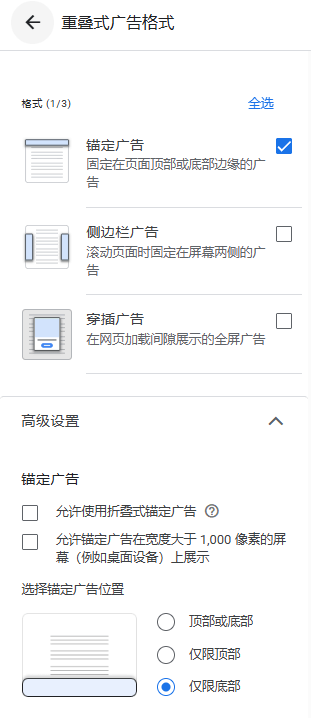
设置路径:Google AdSense—广告—编辑管理自动广告—重叠式广告格式—高级设置
(1)选择侧边栏广告位置:左侧和右侧
参考如下图2:
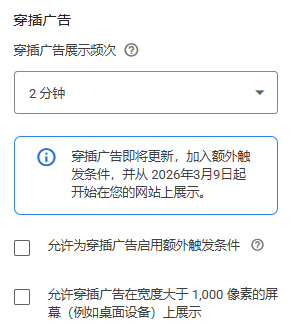
设置路径:Google AdSense—广告—编辑管理自动广告—重叠式广告格式—穿插广告—高级设置
(1)穿插广告展示频次:2分钟
(2)额外触发条件:开发者可自行配置
参考如下图3: